
AI agents have become a more ubiquitous tool for people to better process and understand their financial situation. They can provide us insights into different banking and investing products available to them, as well as how their existing accounts are helping them achieve their long-term financial goals. For those agents to accurately provide answers about their financial situation, the agents must have the relevant information and context. For some folks, they may resort to manually uploading PDF/CSV documents or even providing hand-written summaries of their portfolio make-up.
To bridge this gap for our Wealthfront clients, we built a public MCP server. Users can securely connect their Wealthfront accounts to compatible AI applications to request supported data about their cash and investing account information (e.g. current balance, holdings, tax lots), rather than manually compiling and providing it. We made some intentional design choices in how we exposed our MCP server to the public, and through our testing, we learned how to better configure our MCP server to help AI applications provide better answers to the user’s prompts.
What is MCP?
First off, what is a MCP server? The Model Context Protocol is an open protocol for connecting AI applications to external systems. It gives applications a standard way to discover and call capabilities exposed as tools, resources, and prompts. The protocol closely models the Language Server Protocol used between IDEs and servers, but I like to think of it similar to how we have standardized RESTful HTTP APIs: we define a structure (i.e. protocol) that we expect the servers to follow when defining how to access their data. The main difference is that MCP is a strict protocol vs. REST being more loosely defined.
The Model Context Protocol allows AI agents to discover what capabilities are available to them (e.g. list of tools), and then can choose to make a tool/resource call depending on their intended action. For example, Wealthfront’s tool list in our MCP server will return the following (truncated for brevity):
{
  "jsonrpc": "2.0",
  "id": 2,
  "result": {
    "tools": [
      {
        "name": "finance_account_details",
        "description": "Read one of the authenticated user's Wealthfront accounts by accountId. Returns [... truncated]",
        "inputSchema": {...}
        "annotations": { "readOnlyHint": true, "destructiveHint": false, "idempotentHint": true, "openWorldHint": false }
      },
      {
        "name": "get_accounts",
        "description": "List the user's Wealthfront cash, investing, and Portfolio Line of Credit accounts with current balances.",
        "inputSchema": {...}
        "annotations": { "readOnlyHint": true, "destructiveHint": false, "idempotentHint": true, "openWorldHint": false }
      },
      ...
    ]
  }
}Code language: JSON / JSON with Comments (json)
How we designed our MCP server
To start off, we chose to implement our MCP server with the Streamable HTTP transport under protocol version 2025-11-25. We currently only support synchronous HTTP calls, and will consider implementing server-sent events (SSE) in the future. We also chose to keep all of our capabilities under the tools method, and for those tool calls to have per-tool scope enforcement.
The main technical complexity of implementing the MCP server was how AI applications authenticate with it. For a public MCP server that serves user-specific data, requiring OAuth for authentication and authorization makes the most sense.
As an overview, the OAuth flow for connecting to our MCP server requires the following steps:
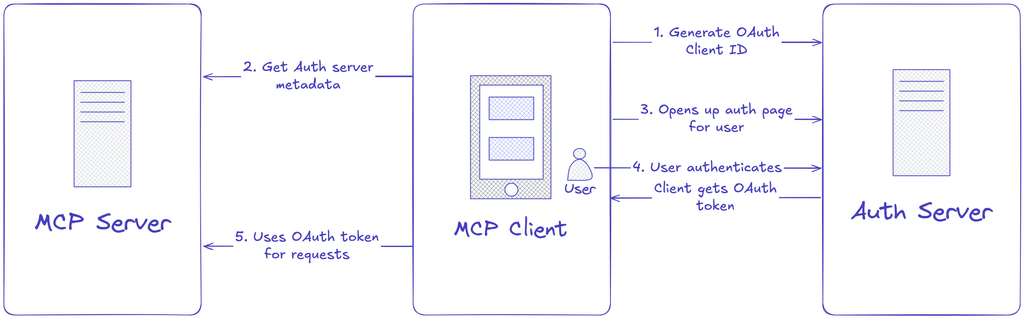
- The client (e.g. AI agent) has a registered OAuth client ID that they can use in their auth request
- The client talks to our MCP server to determine what OAuth authorization server to ask for the OAuth token
- The client makes a request to our OAuth authorization server with the relevant parameters (e.g. aforementioned client ID, redirect URI, challenge code, etc.)
- The Wealthfront user enters their username, password, and MFA in the OAuth login flow to grant access for the client to talk to our MCP server.
- Once approved, the authorization server will provide a short-lived, refreshable OAuth token to the client, which it can then use to make authenticated requests to our MCP server.
The part above that required some careful thought was how the user would register an OAuth client ID with our authorization server. There are several common options for MCP servers that we considered:
Client ID Metadata Documents (CIMDs, for short). An AI application can use an HTTPS URL as the client ID, where the URL returns a JSON document that includes metadata about the OAuth client. This option has become a preferred option in the industry given the seamlessness of connecting without requiring to dynamically register a new client ID. However, only a couple AI agents support this, so this approach would not be sufficient for a general MCP client. For that reason, we deferred implementing this solution.
Dynamic Client Registration (DCR, for short). This approach, as defined in RFC 7591, requires the authorization server to provide an endpoint that allows a client to generate and register a new OAuth client ID. This process is well-defined and seamless for AI agents to follow through. However, the onus is on the authorization server to properly and securely implement it. Exposing a public endpoint requires making sure it’s safe from malicious actors abusing the endpoint via DoS, for example. We didn’t think the implementation scope made sense for our initial launch, and given our engineering perspective of iterating and learning quickly, we also deferred this solution for the future.
User-generated client IDs. We instead chose to build an easy setup page for logged-in Wealthfront users to generate these client IDs for themselves. It allows us to control the dynamic generation of client IDs, and also make those IDs only usable by the user who created it. That way, client IDs cannot be abused by a malicious user to pull information from someone else’s account. Granted, the setup process is less seamless for the Wealthfront user. However, given how easy AI applications have made it to provide this information, we thought it would be a fair tradeoff in getting this MCP server out to the public sooner. For generating your own client ID for a supported AI platform, you can visit this setup page on the Wealthfront site.
Learnings from building and testing the MCP server
In the process of building and testing our MCP server, it was fascinating to see how well AI agents expressed the structured outputs of the tool calls in a human-readable manner. Nonetheless, we discovered that the quality of the agent’s output can be improved greatly by some simple design choices on our MCP server.
Intent-based tool calls vs. entity-based. We discovered that defining our list of tools with the user’s intent in mind (e.g. specific questions that users may prompt) improves the relevancy and speed of the results shown. With API designs, we often think of constructing the endpoints from an entity-standpoint (e.g. CRUD on users, accounts, etc.). However, for an AI agent talking to an MCP server, structuring the endpoint as entity-based makes it harder for the tool to know which to call, particularly when getting granular information. Instead, it’s better to have the tool calls reflect specific features that the user is interested in (e.g. open tax lots in an investing account, or the investing strategy for their managed Wealthfront portfolio).
Well-defined MCP tool call metadata. Providing better documentation for the AI agents to understand how and when to use certain tool calls also makes for higher-quality outputs. Without the specificity, AI agents can make incorrect assumptions about the data inputs and outputs, and even provide glaring misinformation to the user. For instance, when we labeled our unique account identifier field as “accountId”, one of the agents misinterpreted that to be the account ID that shows up in the user’s account statements! Such mistakes can easily be resolved by clearly describing the parameters and outputs of those tool calls. That functionality, in fact, is what makes the Model Context Protocol quite effective: the schema can include human-readable text and explanations, so that AI agents don’t need to guess what the meanings of each field is, as well as know when to use (and not use) the tool.
What’s next?
We are excited to hear from our Wealthfront users how they are using our MCP server. In the upcoming months, we will improve the experience with connecting to our MCP server by making the process of connecting more seamless and by adding more feature support to it. For more information on how to set it up for yourself, please visit our help center article here.
Disclosures
References to any third-party artificial intelligence (AI) platforms are for identification and compatibility purposes only. They do not imply endorsement, sponsorship, affiliation, or that Wealthfront has reviewed or approved those platforms. When you connect your Wealthfront account to a supported third-party AI platform, you direct and authorize Wealthfront to share your Personal Information with that platform in accordance with Wealthfront’s Terms of Use and Privacy Policy.
Wealthfront does not provide investment recommendations or financial, investment, legal, tax, or accounting advice through these connections. Content generated by AI platforms may be inaccurate, incomplete, or outdated. You should review all information before relying on it. Third-party AI platforms are not your financial, investment, legal, tax, or accounting advisor, and it does not execute, settle, custody, insure, or guarantee any transactions or the relevant assets. Wealthfront will only accept account instructions, such as allocation changes, from the account owner.
Third-party AI platforms are not Wealthfront service providers and are not subject to Wealthfront’s privacy commitments. Once your information is shared, the platform’s use of that information is governed by its own terms and privacy policy. Wealthfront makes no guarantees regarding the accuracy, completeness, or suitability of any AI-generated output, and is not responsible for any losses that may result from AI-generated decisions. By utilizing AI platforms, you explicitly assume any risks associated with using AI agents and the processing of your data by third-party AI platforms. The AI connection is provided ‘AS IS” and “AS AVAILABLE,’ without warranties of any kind. Wealthfront makes no representations or warranties regarding the accuracy, completeness, reliability, or suitability of any AI generated output.
The information contained in this communication is provided for general informational purposes only, and should not be construed as investment or tax advice. Nothing in this post should be construed as a solicitation or offer, or recommendation, to buy or sell any security. Investing involves risk, including the possible loss of principal. Past performance does not guarantee future results. Please see our Full Disclosure for further information.
Investment advisory services are provided by Wealthfront Advisers LLC, an SEC-registered investment adviser. Brokerage services are provided by Wealthfront Brokerage LLC, Member FINRA/SIPC. © 2026 Wealthfront Corporation.